Launch and manage ads with AI for free — without losing control.
Connect your advertising accounts and Shopify store to the AI assistant you already use. Spend less time switching between platform dashboards, uncover campaign opportunities faster, and keep ad spend under your control.
These prompts work with the tools available in your chosen client. StoreAdOps skills package reusable steps for setup, performance reviews, campaign drafts, and profit briefs where supported by the client. Recommendations do not change your accounts.
Review performance
Needs: A connected Google or Meta ad account.
Review my last 30 days of Google and Meta advertising. Find wasted spend, tracking issues, and creative fatigue. Show your evidence and make no changes.
Plan a budget change
Needs: A connected ad account, your goals, and any budget limits.
Recommend budget and bid-strategy improvements for my selected account. Explain assumptions and tradeoffs. Do not change any campaigns.
Prepare a campaign
Needs: An ad account, offer, target countries, budget, and creative assets.
Prepare a campaign plan with the exact account, budget, targeting, and creative. Identify missing inputs. Show me the plan before requesting permission to create a paused draft.
Request a profit brief
Needs: Connected commerce and advertising data, with product costs or supplied margin assumptions.
Prepare an on-demand profit brief for yesterday. Separate store revenue from platform-attributed revenue, show ad spend and available costs, and label missing data and estimates. Make no changes.
A prompt runs when you ask. StoreAdOps does not currently deliver hosted scheduled briefs. A profit estimate is only as complete as the revenue, costs, and attribution available.
Your accounts at a glance
Start with the numbers. Continue with a conversation.
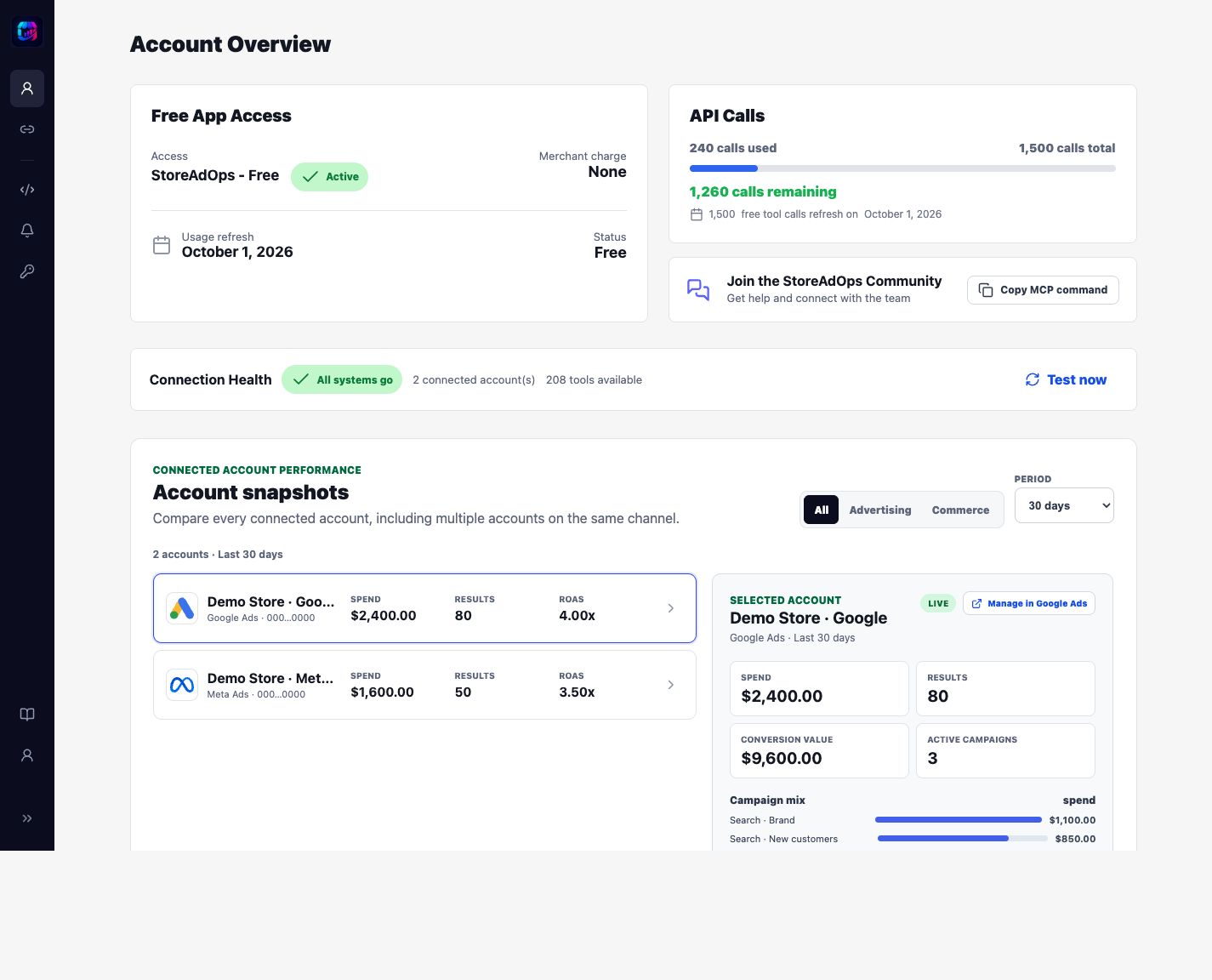
Review connected-account snapshots, spend, conversion value, and campaign performance in StoreAdOps. Use your AI assistant for deeper analysis and proposed changes.
Actual StoreAdOps interface with fictional demo accounts and sample data. This image is not a live report or a promise of results.
How StoreAdOps works
From connected to in control.
Three steps. One familiar place to get things done.
01
Connect your accounts
Choose an available advertising platform or Shopify, authorize access, and select the exact accounts StoreAdOps may use.
02
Bring your AI
Check the ChatGPT directory for installation availability, or connect StoreAdOps MCP to a compatible AI client.
03
Ask, review, and approve
Describe the campaign work in natural language. StoreAdOps retrieves live evidence and requires confirmation before provider changes.
Two ways to use StoreAdOps
Your favorite AI. Now with ad skills.
Check the ChatGPT directory for installation availability, or connect StoreAdOps MCP to a compatible AI client.
Option ACheck availability
Install the ChatGPT plugin
When available in your ChatGPT account, install StoreAdOps and turn one conversation into a command center for your connected advertising and commerce accounts. Find opportunities, review performance, and prepare campaign plans. Both connection paths use the same ten-tool server contract; installed-client permissions, account grants and feature gates still apply. Supported writes require a preview, explicit confirmation and duplicate-write protection.
Add the hosted StoreAdOps MCP connection to a compatible AI client. You choose the client and model while StoreAdOps provides the advertising and commerce tools.
All retained StoreAdOps MCP URLs serve the same ten tools. A directory submission or installation is a separate client-side state, not proof of current access. Provider permissions and feature availability still apply. Read the setup guide.
Built for your peace of mind
AI does the legwork. You make the call.
StoreAdOps separates analysis from account changes and enforces safety on the server. You authorize supported changes; advertising platforms handle delivery and billing.
Google, Meta & Shopify in ChatGPTMicrosoft & TikTok through MCP
Trusted by merchants
Already trusted for the campaign work that matters.
Merchants use StoreAdOps to launch across channels, understand what is driving performance, and manage campaigns with greater clarity and control.
“StoreAdOps helped me launch my first ads across multiple channels. Its AI guidance walked me through each step of campaign setup.”
NM
New Shopify merchantLaunching a first campaign
“With StoreAdOps, it is much easier to get a direct answer to exactly what I’m asking. I do not have to open different websites just to understand and manage my campaigns.”
EM
Existing Shopify merchantManaging campaigns across channels
“StoreAdOps does more than give me a simple AI answer. It analyzes my existing campaign performance and finds opportunities I might otherwise miss.”
IM
Independent store managerImproving active campaigns
A better way to run your ads
StoreAdOps is free.
Open signup includes 1,500 tool calls per UTC calendar month. There is no trial, subscription, payment, or credit card required. Your AI provider may charge separately; advertising spend is paid to your ad platform.
Choose the approved StoreAdOps plugin for ChatGPT, or use the universal MCP connection with another compatible AI client.
Can StoreAdOps spend money without my approval?
No. StoreAdOps makes only confirmed changes. New campaigns are created paused by default. Approved edits to active campaigns can affect delivery and spend immediately; active ads continue running until paused in the advertising platform.
Is StoreAdOps really free?
Yes. Open signup includes 1,500 accepted tool calls per UTC calendar month, with no payment method or automatic paid upgrade. At the limit, further calls are blocked until the next monthly reset. Account Overview shows your remaining calls and reset date. One prompt may use several calls; accepted calls count even if the provider returns an error, while rejected requests and duplicate-write replays do not add another call. AI-provider charges and advertising spend are separate.
What can I use today?
Google and Meta reporting, audits, budget and bidding recommendations, Google ad-copy suggestions, and asset validation are available now. Microsoft Advertising: Available. TikTok Ads: Available. Use the advertising MCP connection at /mcp/packs/ads-v3.
How is connected-account data used?
StoreAdOps uses authorized account data to provide requested analysis and campaign workflows. It is not sold and is not used to train general AI models. Read the privacy policy for details.
Data use
Advertising scopes are used only after user OAuth consent, for user-directed reporting, recommendations, and confirmed changes. Connected-account data is not sold and is not used to train general AI models. StoreAdOps does not control a user's advertising budget.
 ChatGPTwith StoreAdOps
 StoreAdOpsReady for review
Google Search campaign plan
StoreAdOpsReady for review
Google Search campaign plan
 Option B